Hero Image
CI/CD & Production Infrastructure for a Social App

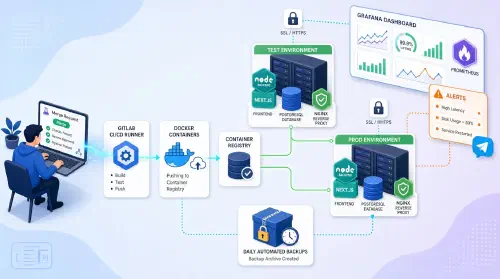
Production Infrastructure & CI/CD for a Social App Launch Client Puzzle Master β€” a social matching platform Challenge The startup had a production-ready Nest.js backend and Angular frontend, but zero infrastructure: deployments were manual, there was no CI/CD, no monitoring, no backups, and no separation between dev and prod environments. The goal was to build a complete DevOps stack from scratch before the public launch. Solution 1. Application Containerization Multi-stage Dockerfile for backend (Nest.js + Prisma, non-root user) Multi-stage Dockerfile for frontend (Angular 12, legacy OpenSSL, Nginx for static assets) Docker Compose full stack: PostgreSQL 15, Redis 7, imgproxy, Nginx Healthchecks and depends_on for correct startup ordering Isolated dev and prod environments in /opt/dev and /opt/prod 2. GitLab CI/CD Migration of repository from Bitbucket to GitLab Pipeline for backend and frontend: build β†’ push β†’ deploy GitLab Container Registry for Docker image storage Automatic deploy to dev on every push; manual trigger for prod SSH deployment to VPS via SSH_PRIVATE_KEY 3. Nginx Reverse Proxy Environment-agnostic config via envsubst for dev/prod parity SSL/TLS (TLSv1.2, TLSv1.3) with Cloudflare certificates Routing: /api/* β†’ backend:4000, /* β†’ frontend:80 www β†’ root domain redirect (301) Separate imgproxy stack with SSL termination 4. Security (Ansible) Server hardening via Ansible: SSH key-only auth, root login disabled UFW Firewall: only ports 80, 443, and custom SSH open Database accessible only via SSH tunnel All secrets stored in GitLab CI/CD variables 5. Monitoring Prometheus + Grafana with automated dashboard provisioning Exporters: Node, cAdvisor, Postgres, Redis, Nginx, Blackbox 5 Grafana dashboards: server, Docker containers, PostgreSQL, Redis, Nginx Alertmanager with Slack/webhook integration; alerts on CPU/RAM/Disk/API/SSL 6. Database Backups Automated pg_dump every hour gzip compression and upload to S3-compatible object storage (Cloudflare R2) Prometheus backup metrics: success status, size, timestamp Alerts: DatabaseBackupMissing, DatabaseBackupFailed, DatabaseBackupSizeAnomaly Technologies GitLab CI Docker Ansible Prometheus Nginx PostgreSQL Results βœ… Deploy: git push to main β†’ automatic build and deploy to server βœ… Environments: full dev/prod isolation on a single VPS βœ… Monitoring: 5 dashboards, alerts across 6 categories βœ… Backups: automated hourly pg_dump to Cloudflare R2 βœ… Security: UFW, key-based SSH, database inaccessible from outside βœ… Scalability: architecture ready for database extraction to a dedicated server

Hero Image
Migration and DevOps for a CS-Cart Marketplace

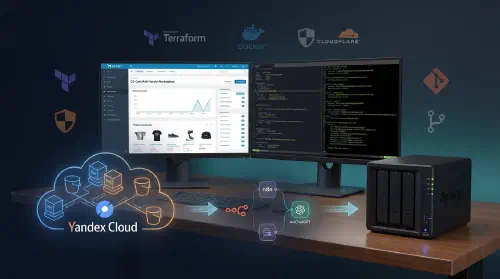
Infrastructure and Deployment of a Multi-Vendor CS-Cart Marketplace Client Multi-vendor marketplace Challenge Revive a legacy marketplace project and migrate it from standard shared hosting to a modern cloud environment. Ensure high availability, build CI/CD infrastructure, set up test environments, integrate third-party delivery services, and automate routine operations with AI. At the final stage, prepare an on-premise server (NAS) on the client side for cold repository storage. Solution 1. Infrastructure in Yandex Cloud (Terraform) Built IaC configuration (Terraform) to provision Yandex Cloud infrastructure (virtual networks, VMs). Configured separate virtual machines for production and development environments. Attached and partitioned additional disks, deployed automated backups for databases and files to Yandex Object Storage (S3). Used Yandex Cloud Postbox for reliable service email delivery (domain, SPF, DKIM configured). 2. Containerization and Microservices Migrated the marketplace from classic hosting to a Docker-based VPS environment. Built a custom Dockerfile for CS-Cart and a docker-compose stack with a microservice-oriented web server architecture. Established full-featured dev and prod environments. Configured deployment pipelines via a local Git server (Forgejo). 3. Marketplace Platform (CS-Cart) Upgraded the CS-Cart core and optimized the database by removing obsolete, unused plugins. Deployed a clean platform installation with a new commercial theme. Configured multi-vendor business logic: role separation and seller dashboards. Integrated and configured modules: dynamic product loading, AI capabilities, smart live search, and SEO module. Integrated shipping (CDEK) and payment systems. Launched automated data exchange with 1C accounting systems. 4. Automation and n8n Deployed n8n process orchestration. Integrated ChatGPT API to automate repetitive operations such as content generation and normalization. Configured workers and triggers for store business workflows. 5. Security and Cloudflare Configured Cloudflare Proxy DNS. Implemented Cloudflare Turnstile to reduce spam during sign-up and checkout flows. Added bot protection: disabled direct registrations, configured strict caching, and filtered low-quality traffic. Installed SSL certificates and configured proper redirects. 6. On-Premise Infrastructure and Documentation Set up a dedicated subdomain with a wiki engine for technical and user documentation. Implemented local infrastructure in the client’s office based on Synology NAS: Docker, S3 buckets, and backups. Deployed a local Git server (Forgejo) with a CI/CD runner for version control and long-term preservation of project assets. Collected a complete backup of Terraform states, passwords, codebases, and configurations. 7. Project Archival and Repositories Migrated the production site to backup hosting for archival mode and disabled active synchronizations. Procured and configured Synology NAS in the office: external access, Docker, S3 buckets. Deployed Forgejo with a runner under the git.* domain. Repositories included: website source code, theme and add-ons, documentation, n8n workflows, Telegram bots, DB backups, terraform-yandex, terraform-cloudflare, and password vault. Technologies Docker Terraform Yandex Cloud Nginx Forgejo Linux Results βœ… Infrastructure: shared hosting β†’ VPS in Yandex Cloud via Terraform, fully containerized with Docker βœ… Platform: clean CS-Cart Multi-Vendor installation replaced a heavily modified legacy core βœ… Theme and modules: commercial theme, live search, UX/UI improvements, SMS authentication, AJAX catalog βœ… Integrations: CDEK, Boxberry, Russian Post, Faster Payments System (SBP), and dual-environment 1C exchange βœ… Documentation: wiki on docs.* subdomain with a complete project structure βœ… Automation: n8n + ChatGPT API for routine operations βœ… Backups: Yandex Object Storage + mirrored copy on office Synology NAS βœ… Git: self-hosted Forgejo on NAS with runner and full project repositories βœ… Archival handover: project fully transferred to the client’s on-premise Synology NAS, including a private Forgejo Git server.


Hero Image
Prometheus + Grafana Monitoring Stack

Observability Stack for Microservices Architecture Client Early-stage startup Challenge After migrating to a microservices architecture (15+ services), the team had no centralized monitoring in place. Issues were only discovered through user complaints β€” typically 30+ minutes after they occurred. A full observability stack was needed to detect and diagnose problems proactively. Solution 1. Monitoring Architecture Prometheus for metrics collection Grafana for visualization Loki for centralized log aggregation Jaeger for distributed tracing Alertmanager for notifications 2. Metrics Collection Automatic service discovery in Kubernetes Application-level custom metrics System metrics via node-exporter Database metrics via postgres-exporter and redis-exporter 3. Grafana Dashboards Per-service dashboards for each microservice Unified infrastructure overview dashboard SLA/SLO tracking metrics Business metrics (RPS, conversion rate) 4. Centralized Logging (Loki) Log aggregation across all services Full-text log search via Grafana Log-to-metric correlation 5. Distributed Tracing (Jaeger) HTTP request tracing across services Call chain visualization Bottleneck identification Per-service latency analysis 6. Alerting Alerts delivered to Slack / PagerDuty / custom webhooks Critical issue escalation On-call rotation support Automatic incident creation Technologies Prometheus Grafana Kubernetes Docker Helm Linux Results βœ… MTTD: reduced from 30 minutes to under 1 minute βœ… MTTR: recovery time reduced by 60% βœ… Alerts: proactive notifications before users are impacted βœ… Visibility: full observability across all services βœ… Capacity planning: data-driven resource forecasting

Hero Image
Self-Hosted Cloud Storage with Nextcloud

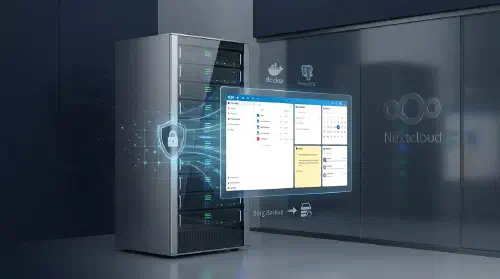
Self-Hosted Corporate Cloud Client Mid-sized business with strict data privacy and data residency requirements Challenge The company relied on third-party cloud services to store and share work files, creating data leakage risks and dependency on external providers. They needed a self-hosted solution with in-browser document editing, deleted file recovery, revision history, and additional collaboration tools β€” calendar, notes, and email β€” all under their own control. Solution 1. Nextcloud AIO Deployment Nextcloud All-in-One β€” official Docker image with the full stack out of the box PostgreSQL for application data storage Redis for caching and background job queues Nginx as a reverse proxy with automatic SSL/TLS 2. In-Browser Document Editing Nextcloud Office (Collabora Online) β€” built-in office suite Support for .docx, .xlsx, .pptx and ODF formats Real-time collaborative editing No local software installation required 3. File Management Deleted files trash bin with configurable retention period File version history β€” roll back to any previous revision Granular access control: folders, share links, passwords Mobile and desktop sync clients 4. Collaboration Tools Calendar (CalDAV) β€” team scheduling and events Notes β€” personal and team notes with Markdown support Mail β€” built-in web client for corporate email (IMAP/SMTP) 5. Backup Borg Backup β€” incremental backup built into Nextcloud AIO Data deduplication and compression Scheduled automatic runs Remote storage for backups (S3-compatible / SFTP) Technologies Nextcloud Docker PostgreSQL Nginx Linux Results βœ… Data ownership: files stay on company servers, no third-party providers βœ… In-browser editing: office documents open and edit directly in the browser βœ… Safety net: version history and trash bin protect against accidental data loss βœ… Unified platform: single solution for files, calendar, notes, and email βœ… Automated backups: incremental backup via Borg Backup on a set schedule

Hero Image
Self-Hosted Corporate Messenger (Matrix)

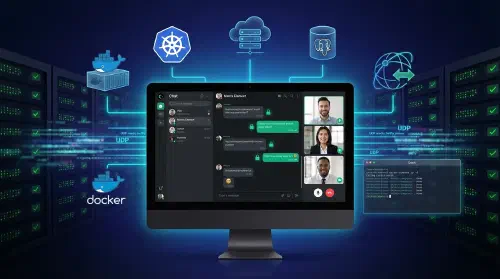
Self-Hosted Secure Messenger for Enterprise Communications Client Mid-size business with strict data privacy and security requirements Challenge The company required full control over its internal communications β€” no third-party servers, no data leakage risks. The solution had to support end-to-end encryption, voice and video calls, file sharing, and seamless integration with existing corporate infrastructure, all manageable by an internal team. Solution 1. Server Stack Matrix Synapse as the core messaging server PostgreSQL 16 for persistent data storage Caddy as reverse proxy with automatic SSL/TLS Docker Compose for service orchestration 2. Client Applications Element Web for browser access Element Desktop for Windows/macOS/Linux Element Mobile for iOS/Android Consistent interface across all platforms 3. Voice & Video Calls Coturn (TURN/STUN server) for NAT traversal Group video call support UDP ports 49160–49200 for media traffic Automatic configuration via environment variables 4. Administration Synapse Admin web UI for user and room management Usage statistics and monitoring Accessible on a dedicated port (8888) 5. Security End-to-end encrypted messages Automatic SSL/TLS certificates via Caddy Public registration disabled Optional federation with other Matrix servers Healthchecks on all services 6. Automation Single Bash script for full stack initialization Automatic Synapse config generation Automated admin user creation via expect Docker Compose with dependency ordering and healthchecks Technologies Docker PostgreSQL Caddy Bash Linux Element + Matrix + Synapse Results βœ… Data ownership: full control over messages and user data β€” no third-party servers βœ… Scale: 100+ concurrent users βœ… Features: text, voice, video, file sharing up to 1.5 GB, E2E encryption βœ… Speed: full deployment in 5 minutes with a single script βœ… Reliability: automatic SSL certificates, healthchecks, auto-restart

Hero Image
WireGuard VPN Infrastructure

WireGuard VPN Infrastructure Challenge A distributed team of 15+ engineers working across multiple locations needed secure, low-latency access to internal corporate infrastructure β€” without relying on heavyweight legacy VPN appliances. The existing setup introduced significant overhead, was difficult to maintain, and caused frequent connectivity issues for remote employees. The goal was to replace it with a lightweight, self-hosted solution that is fast, auditable, and easy to scale. Solution 1. Technology Selection Protocol evaluation: OpenVPN, WireGuard, Outline WireGuard chosen for its speed, simplicity, and modern cryptography Docker for isolation and portability Ansible for automated provisioning 2. Infrastructure VPS hosted in a neutral jurisdiction (Netherlands) Docker Compose for service orchestration WireGuard running in a container Nginx for the web management panel Prometheus + Grafana for monitoring 3. Automation # Ansible playbook for deployment - name: Deploy WireGuard VPN hosts: vpn_servers roles: - docker - wireguard - monitoring - backup 4. Security Automatic key rotation Firewall rules (UFW) Fail2ban for brute-force protection ChaCha20-Poly1305 traffic encryption 5. Monitoring Bandwidth and throughput metrics Downtime alerts Connection logging Automatic restart on failure Technologies WireGuard Docker Ansible Prometheus Results βœ… Uptime: 99.8% over 6+ months of operation βœ… Speed: stable 100+ Mbps βœ… Access: OpenAI API, ChatGPT, GitHub Copilot, npm registry βœ… Deployment time: ~20 minutes per new server βœ… Users: 15+ developers with zero connectivity issues